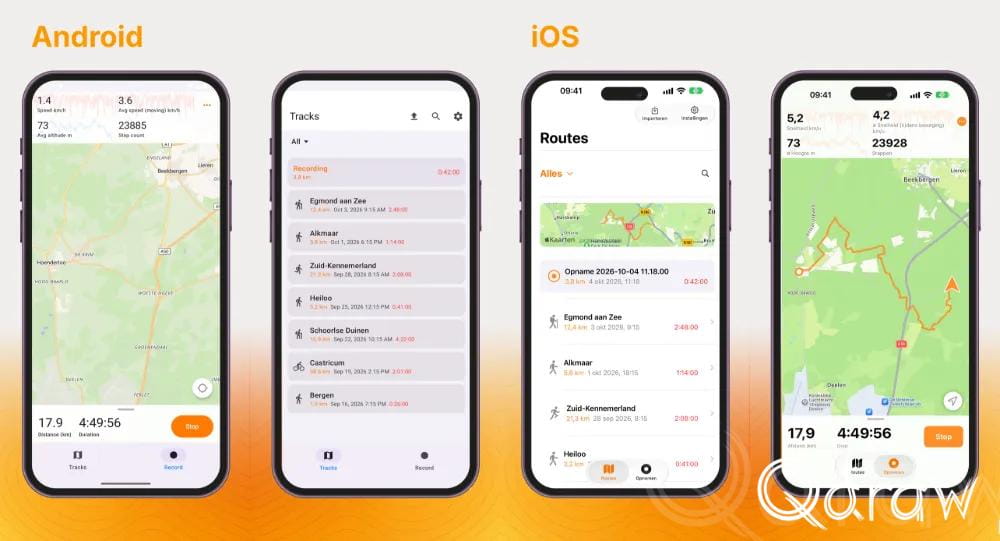
TrailTrackr Android closed test: one more week, and here’s what has already improved
3 min read
TrailTrackr is in the final week of the closed test. That is a good moment to stop and thank everyone taking part. A huge thank you to all testers! You installed the app, tried it out and shared your experiences with me. Thanks to your tips, screenshots and honest feedback the app has improved in many places. That is exactly what such a test is for, and I really appreciate the time you put into it.
Below you can read briefly what has changed so far and what you can still do for me in the last week. Feedback remains welcome, even if it is something small.
What has been fixed
Easier to read
A tester with larger letters in Android saw text that was cut off or unreadable. All screens now grow with the font size and scroll where needed. I checked every one of them at the largest text size.
The duration in the track overview was red and therefore looked like an error message. It is now orange, just like the distance.
Clearer to use
The buttons on a track’s detail screen now have a word next to them: “Edit” next to the pencil and “Continue” next to the plus.
The warning about background activity is friendlier and clearer. There is no red text anymore. “Disable battery optimization” is a prominent button and the text talks about “GPS tracking” instead of “recording”.
In “Customize statistics” you can now scroll and you can hide all statistics, including the first four. The pin shows which statistics are at the top while recording.
More reliable recording
Elevation and ascent were not tracked on some phones. That now works on every phone, and the elevation is now height above sea level. It used to be about 45 metres too high.
A single stray GPS reading could cause a big spike in your track. Such outliers are now ignored.
Anyone recording indoors got a scribble of jumping points. That has been fixed.
When saving, your track gets the place name in its title again.
If your phone’s location is off, the app warns you before you start. While recording, a notice shows that the app is waiting for GPS.
Map
After starting, the map immediately follows your position.
Small arrows in the track show which way you walked.
The arrow of your own position sometimes pointed the wrong way. It now uses the GPS heading while you move and the compass when you stand still.
Tip: did you move the map while recording? The center button jumps back to your own position.
The final week
Keep the app installed. Do not remove TrailTrackr and stay signed up as a tester until the test is over. Google only counts testers who stay enrolled for the whole period.
Keep using the app. Take a hike, a bike ride or a walk around the block. The more you use the app in real life, the sooner you notice things that could be better. Your tracks stay on your own phone, I cannot see them.
Feedback is welcome, even if it seems small. An unclear text, a button you do not understand, something that looks odd or a track that is not right: I want to know. Send a message via WhatsApp or email support@qdraw.nl. A screenshot helps. Sharing a track (GPX) is only needed if you want to.
Still on the list (TODO)
I am still working on a few ideas from your feedback: